Native macOS app · Free
Keep track of the papers
you read, so you can
find them again.
A fast, native macOS app to collect → tag → rate → recall papers, books, and reports. Plain files in a folder you own. No account, no subscription.
macOS 14 or later · Apple Silicon & Intel · Free
Why Sift
Reference managers got heavy. Sift didn't. Collect a paper the moment you find it, tag it, rate it, and find it again months later. That's the whole loop.
-
It's yours, as plain files
Each paper is a PDF plus a small JSON file. Open, back up, grep, or sync it yourself. No lock-in.
-
Fast and native
A native Mac app that launches instantly and opens PDFs in Preview. Small and quick.
-
No account, no tracking
No login, no telemetry. Download it once and it's yours.
-
Smart only if you want
Optional: with Ollama or Claude Code installed, Sift auto-tags papers, writes a short summary, and sorts them into subject-area folders on your machine. Without one, everything else works exactly the same.
Sync & Cost
Sift writes plain files to any folder you choose. Put that folder in iCloud Drive, Google Drive, Dropbox, or OneDrive and your desktop sync client handles the rest. No sync server, no account.
The part that saves you money
Zotero charges past its 300 MB free tier ($20/$60/$120 a year for 2/6/unlimited GB), and PDFs pass that quickly. Sift runs no storage at all, so your papers use the cloud storage you already pay for. iCloud's free 5 GB alone is about 16× Zotero's free limit.
If you already pay for the cloud, you don't also pay for the reference manager's cloud.
A Look at the App
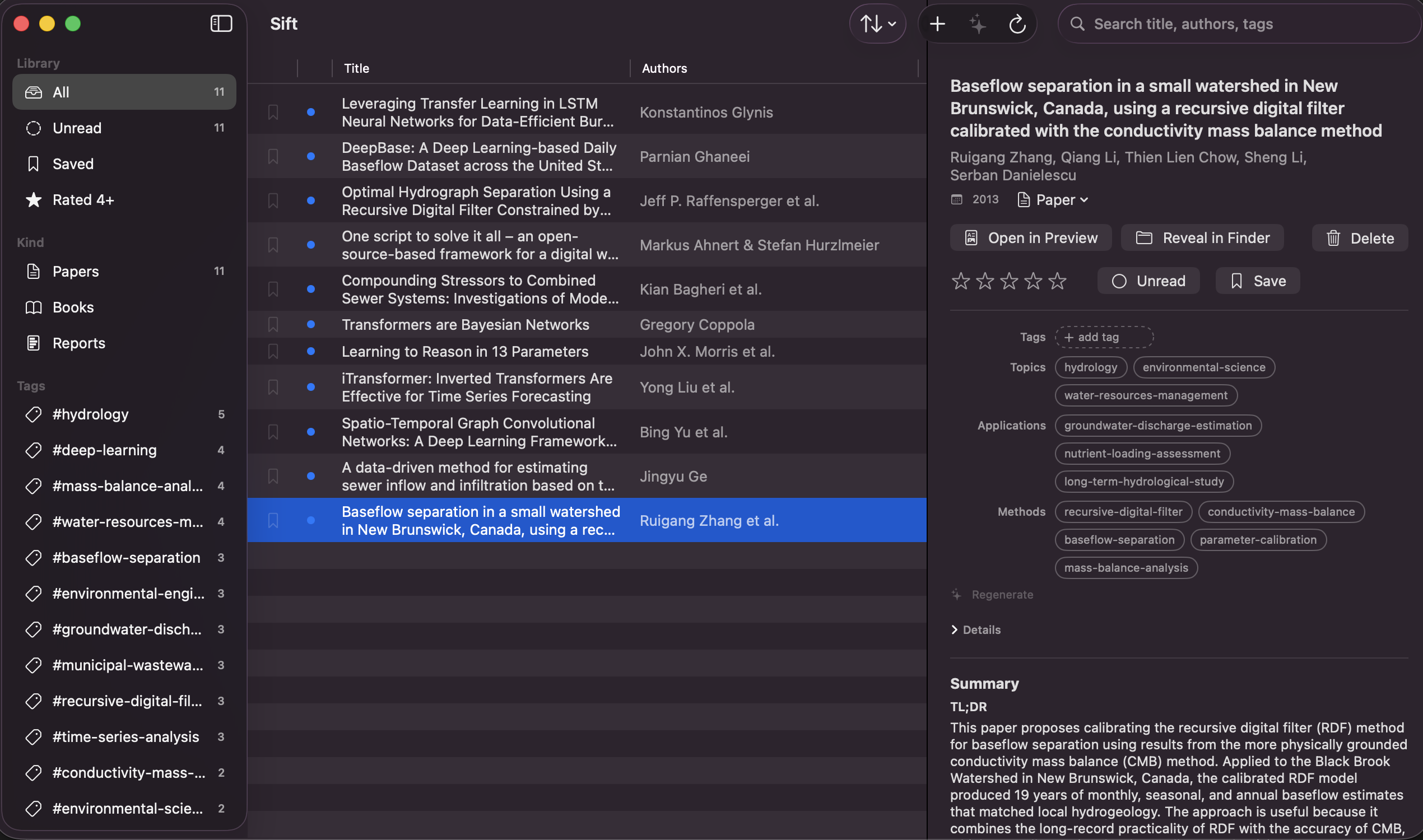
Three panes: filter on the left (by kind, folder, author, or tag), your library in the middle, paper details on the right.
Install in Three Steps
This build is signed ad-hoc (not notarized), so Gatekeeper warns on first launch. The right-click trick is needed once.
-
Download the DMG
Grab
Sift-<version>.dmgfrom the latest release. -
Drag to Applications
Open the DMG and drag
Sift.appinto yourApplicationsfolder. -
Right-click → Open
Right-click the app, choose Open, then Open again to clear the first-launch warning.
Free · macOS 14+ · no account required
Deliberately Simple
Sift stays focused on cataloging the papers you read. A few deliberate choices keep it fast and out of your way.
-
Reading happens in Preview
Sift opens PDFs in Preview, where macOS already handles reading and annotations well.
-
A focused catalog
No BibTeX, RIS, or DOI export today. It could arrive later as an optional add-on.
-
Sync through your cloud folder
No account and no push service: expect a few seconds of delay, and never a login screen. iCloud Drive, Google Drive, Dropbox, or OneDrive — whatever you already use.